


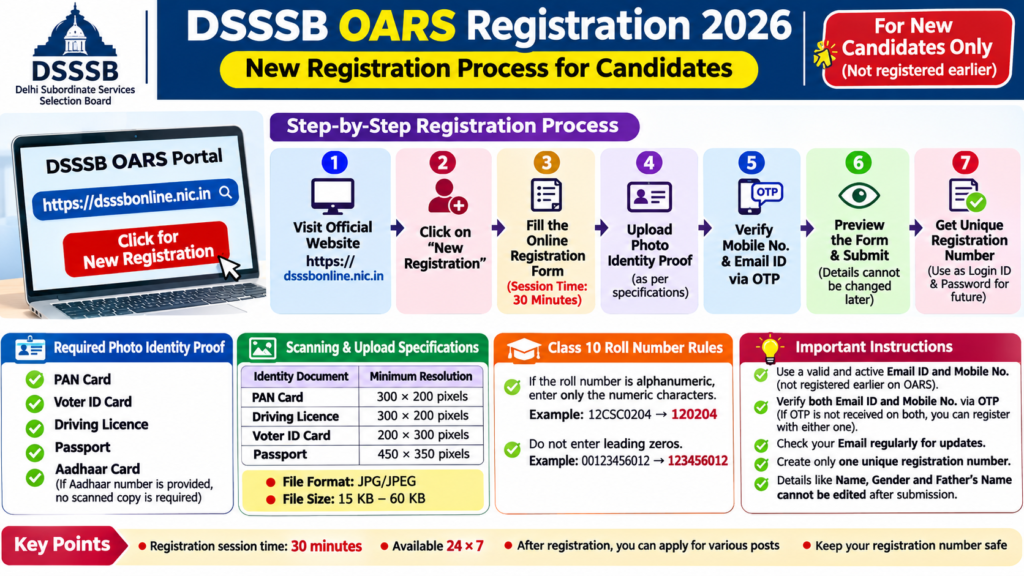
DSSSB JE and MTS OARS Registration 2026-Candidates who wish to apply for DSSSB JE and MTS Recruitment 2026 must first complete their registration on the Online Application Registration System (OARS) portal. Applicants who have already registered on the OARS portal do not need to create a new registration number.
New candidates can complete their registration by visiting the official website: https://dsssbonline.nic.in.
DSSSB JE and MTS OARS Registration 2026
Step 1: Visit the DSSSB OARS Portal
- Open the official DSSSB online application website: https://dsssbonline.nic.in.
- Click on the New Registration option.
- Complete the online registration form by entering the required personal and educational details.
Candidates should note that the session time for completing the registration form is 30 minutes. Therefore, keep all required documents and information ready before starting.
Step 2: Keep Your Photo Identity Proof Ready
Before starting registration, candidates must arrange a scanned copy of their photo identity proof.
The Board accepts the following identity documents:
- PAN Card
- Voter ID Card
- Driving Licence
- Passport
- Aadhaar Card
If a candidate provides an Aadhaar number as identity proof, uploading a scanned copy of the Aadhaar card is not required.
For other identity documents, candidates must upload a scanned image in JPG/JPEG format.
DSSSB JE and MTS recruitment check all details
Step 3: Photo ID Scanning Specifications
Candidates must ensure that their identity document is clearly visible and readable.
| Identity Document | Minimum Resolution |
| PAN Card | 300 × 200 pixels |
| Driving Licence | 300 × 200 pixels |
| Voter ID Card | 200 × 300 pixels |
| Passport | 450 × 350 pixels |
File Size Requirements:
- Minimum file size: 15 KB
- Maximum file size: 60 KB
- Format: JPG/JPEG
Blurred or unclear identity documents should not be uploaded.
Step 4: Enter a Valid Email ID and Mobile Number
Candidates must provide an active email ID and mobile number during registration.
Important instructions:
- An email ID already registered on the OARS portal will not be accepted.
- A mobile number already registered on the OARS portal will not be accepted.
- Candidates should verify their email ID and mobile number through OTP.
- If OTP is not received on both, registration can be completed using the OTP received on either the registered mobile number or email ID.
Candidates should regularly check their registered email accounts for important examination-related communication from DSSSB.
Step 5: Enter Class 10 Roll Number Correctly
Candidates must be careful while entering their Class 10 roll number.
Important instructions from DSSSB:
- If the Class 10 roll number contains both letters and numbers, enter only the numerical characters.
Example: If the roll number is 12CSC0204, enter 120204.
- Do not enter leading zeros before the roll number.
Example: If the roll number is 00123456012, the system will automatically remove the leading zeros.
Candidates should carefully check their Class 10 roll number before submitting the registration form.
Step 6: Preview and Submit the Registration Form
Before final submission, candidates are advised to preview the complete registration form and verify all the information.
Pay particular attention to:
- Candidate’s Name
- Father’s Name
- Gender
- Date of Birth
- Educational Details
- Mobile Number
- Email ID
- Identity Proof Details
Important: DSSSB has clearly stated that details such as the candidate’s name, gender and father’s name cannot be edited under any circumstances once entered. Registration details cannot be changed after final submission.
Therefore, candidates should submit the form only after carefully checking the preview.
Step 7: Registration Number and Login Details
After successful registration, candidates will receive a unique registration number.
This registration number will be used as the login ID and password for future access to the OARS portal, as specified in the registration instructions.
Candidates should remember the following:
- Create only one unique registration number.
- Do not create multiple OARS accounts.
- Keep the registration number safe.
- Use the registration number to log in for future applications.
After completing registration, candidates can apply for different DSSSB posts through the OARS portal.
Important Instructions for DSSSB OARS Registration
| Particulars | Instructions |
| Official Website | dsssbonline.nic.in |
| Registration Type | New Registration |
| Registration Session Time | 30 minutes |
| Photo ID Format | JPG/JPEG |
| Photo ID File Size | 15 KB–60 KB |
| Email Verification | OTP |
| Mobile Verification | OTP |
| Registration Number | Unique registration number |
| Multiple Registration | Not allowed |
| Application for Posts | After successful registration |
Important Advice for Candidates
Candidates should not wait until the last date of application to complete OARS registration. Keep your identity proof, Class 10 roll number, active mobile number and email ID ready.
Remember that your registration details, particularly your name, gender and father’s name, cannot be corrected after final submission. Carefully review the form before clicking the final submit button.
Official Website: https://dsssbonline.nic.in


